One repository, several AI tools
Keep the editing tool and the reported model separate, so a multi-tool workflow does not collapse into one generic AI bucket.
Current lines by tool and model
Know who wrote your code.
See current code contribution by AI tool and model, inspect observed repository token activity, and keep evidence gaps visible—all through a local CLI with no account or telemetry.
npm install -g llmstatus@latest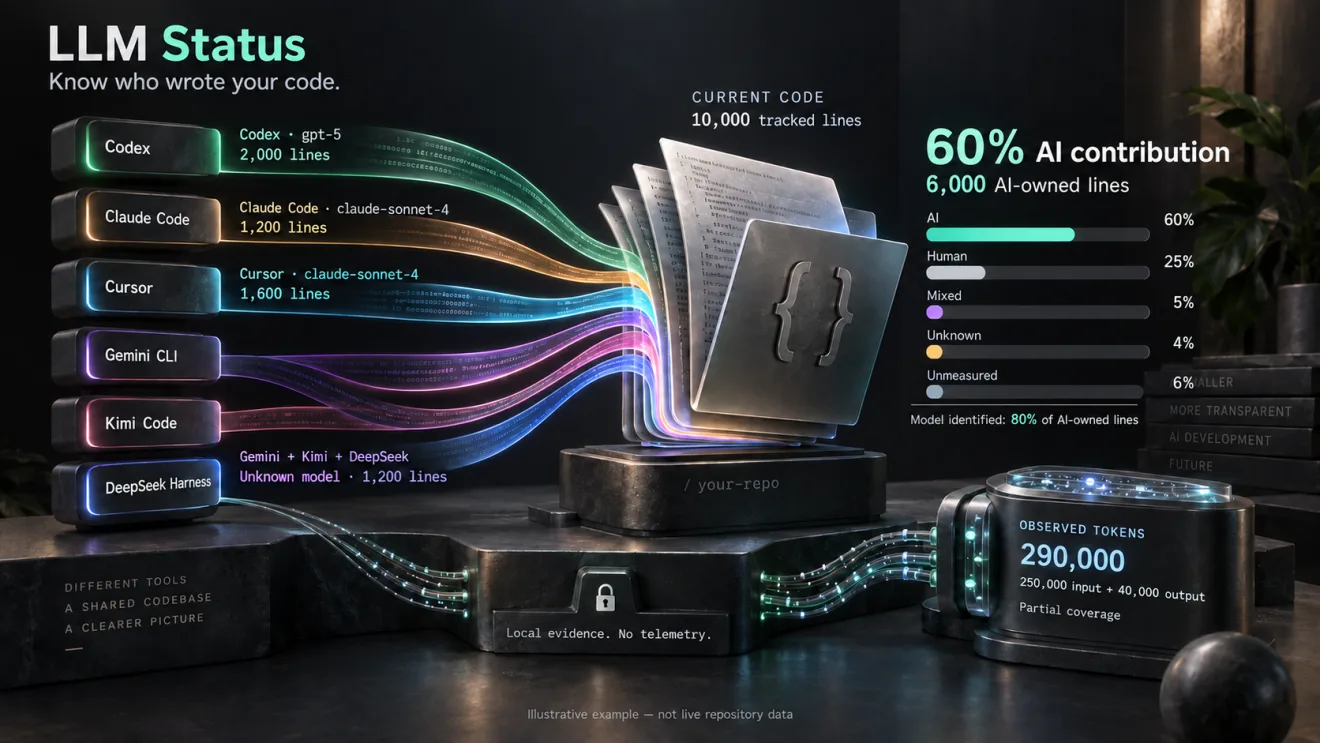 Illustrative example
Keep the editing tool and the reported model separate, so a multi-tool workflow does not collapse into one generic AI bucket.
Current lines by tool and model
See the ownership evidence for Git-tracked lines that survive today instead of treating historical edit counts as the repository snapshot.
AI · Measured Human · Mixed · Unknown · Unmeasured
Inspect observed repository activity over a selected period while keeping incomplete counters and coverage gaps explicit.
Input · output · total · cache · reasoning
This entire example is fictional. The same shared dataset drives every number below.
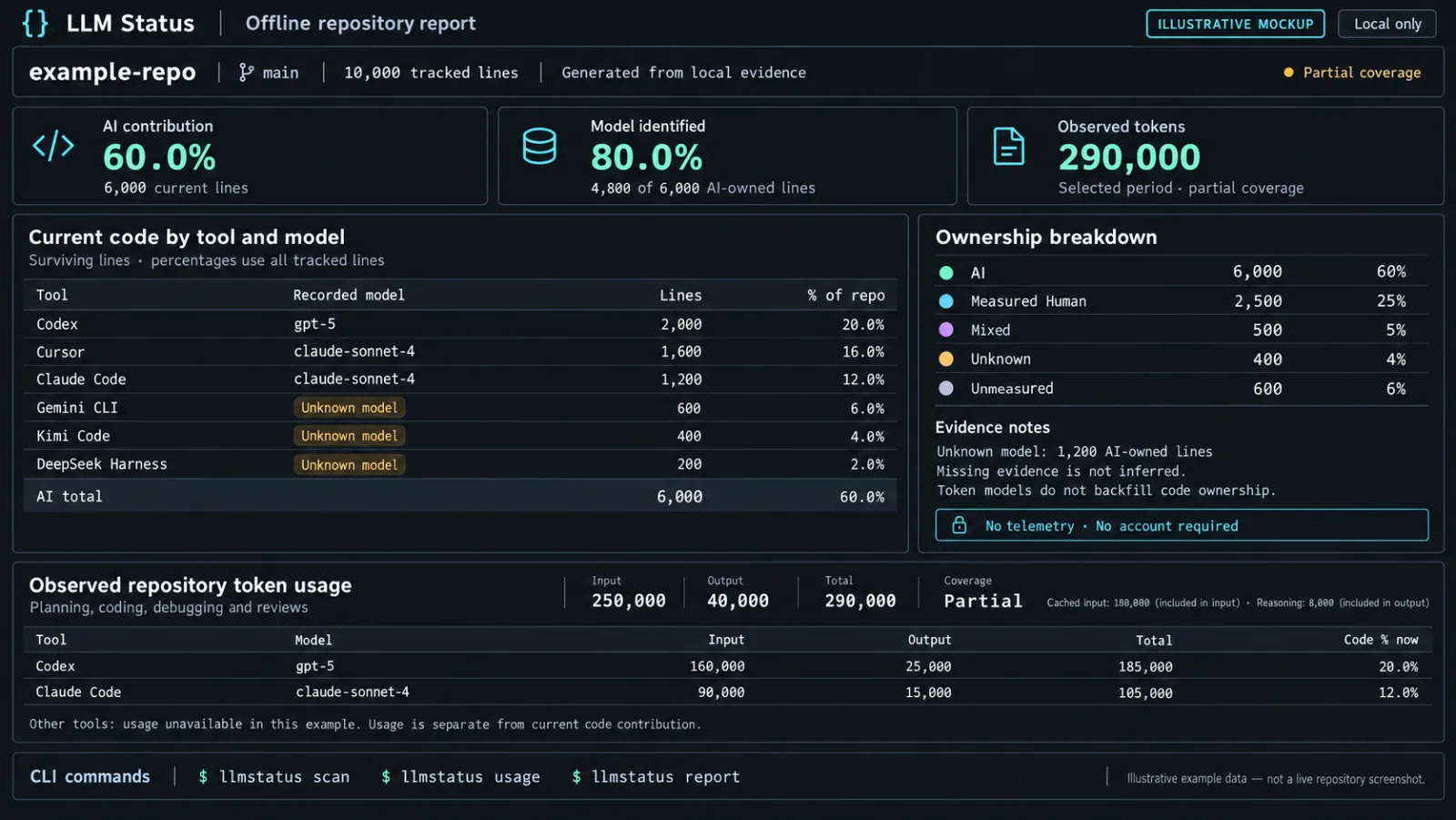
Ownership · 10,000 tracked lines
Surviving lines; percentages use all tracked lines.
| Tool | Recorded model | Lines | Repository |
|---|---|---|---|
| Codex | gpt-5 | 2,000 | 20% |
| Cursor | claude-sonnet-4 | 1,600 | 16% |
| Claude Code | claude-sonnet-4 | 1,200 | 12% |
| Gemini CLI | Unknown model | 600 | 6% |
| Kimi Code CLI | Unknown model | 400 | 4% |
| DeepSeek Harness | Unknown model | 200 | 2% |
Token usage covers observed activity over time. Code contribution describes the current repository snapshot. Their ratio is not an efficiency, ROI, productivity, or model-quality score.
Install the public npm package globally, then initialise LLM Status inside an existing Git repository.
Enable one or more qualified integrations, follow each activation instruction, and start a fresh trusted session.
Scan current contribution, open the offline report, and optionally refresh supported token activity while you work.
Editing-tool capture, per-edit model evidence, and token collection are separate support surfaces.
| Tool / surface | Editing evidence | Model evidence | Token collection | Qualified setup |
|---|---|---|---|---|
| Claude CodeCLI · VS Code extension | Write / Edit hooks | When the file hook supplies it; standard hooks often omit it | Native project-session sync | 2.1.139+ · trusted project hooks |
| CodexCLI · local desktop · IDE conditional | Structured apply_patch hooks | When the file hook supplies it | Native local rollout sync | CLI 0.124.0+ · trusted project hooks |
| CursorIDE | Agent Chat / Cmd+K and Tab edit hooks | Explicit model_id or model from the file hook | External normalized import only | 1.7.0+ · trusted workspace hooks |
| Gemini CLICLI · VS Code Companion | write_file / replace hooks | Unknown with the current adapter | Native project-chat sync | Stable 0.58.0+ within 0.x · trusted project hooks |
| Kimi Code CLICLI · IDE via ACP | Write / Edit plugin callbacks | Unknown with the current adapter | Native wire 1.5 journal sync | Stable 0.41.0+ within 0.x · plugin activation required |
| DeepSeek HarnessCLI · local web · IDE via ACP | Native write / edit plugin events | Unknown with the native plugin | Native session sync | dsh 0.1.2-rc.1 preview · launch overlay required |
CLI · VS Code extension
CLI · local desktop · IDE conditional
IDE
CLI · VS Code Companion
CLI · IDE via ACP
CLI · local web · IDE via ACP
Copilot, Windsurf, arbitrary editor extensions, generic clipboard changes, and cloud-agent capture do not currently have automatic adapters. Explicit manual declarations remain user-supplied evidence.
A one-time scan can only use the evidence available now. Keep supported integrations active so new edits can add better evidence without relabelling untouched lines.
If model B explicitly replaces 20 lines, the current snapshot can show 80 for A and 20 for B. Untouched lines keep their earlier evidence. Unknown model remains distinct from Unknown or Unmeasured code origin.
The CLI makes no network calls and collects no telemetry. It does not store raw source, prompts, responses, tokens, or credentials in its provenance ledger or usage store.
Private metadata can still be sensitive: paths, tool/model/session IDs, hashes, and local installation paths are not anonymous. Review private artifacts before sharing.
Optional sharing path
Requirements: Node.js 20+, Git 2.45+, and an existing Git repository. A stable global installation is recommended for ongoing hooks.
npm install -g llmstatus@latestcd your-repositoryllmstatus initllmstatus integrate codexFollow the printed activation instructions, start a fresh trusted session, and make a supported edit to a Git-tracked file. Multiple integrations can be enabled in the same repository.
llmstatus scanllmstatus reportllmstatus badge --writeToken collection is off by default, opt-in per checkout, command-triggered under a cooldown, and never a background daemon.
llmstatus usage auto enablellmstatus usageAutomatic capture is currently qualified primarily for main Git worktrees on macOS and Linux. Linked worktrees are unsupported, and live Windows integration qualification is incomplete.
Install the public MIT-licensed package, connect a supported tool, and let reliable evidence accumulate from here.
npm install -g llmstatus@latest