Skip to content
    All products
    BUILDING
    macOS
    Native SwiftUI
    A calmer localhost

    Every local port.
    One clean menu.

    PortScanner shows which projects and processes are listening on your Mac, groups their endpoints, and gives you safe controls to open, start, restart, or stop them.

    Native for macOS 14+ · No sudo · No account · No telemetry
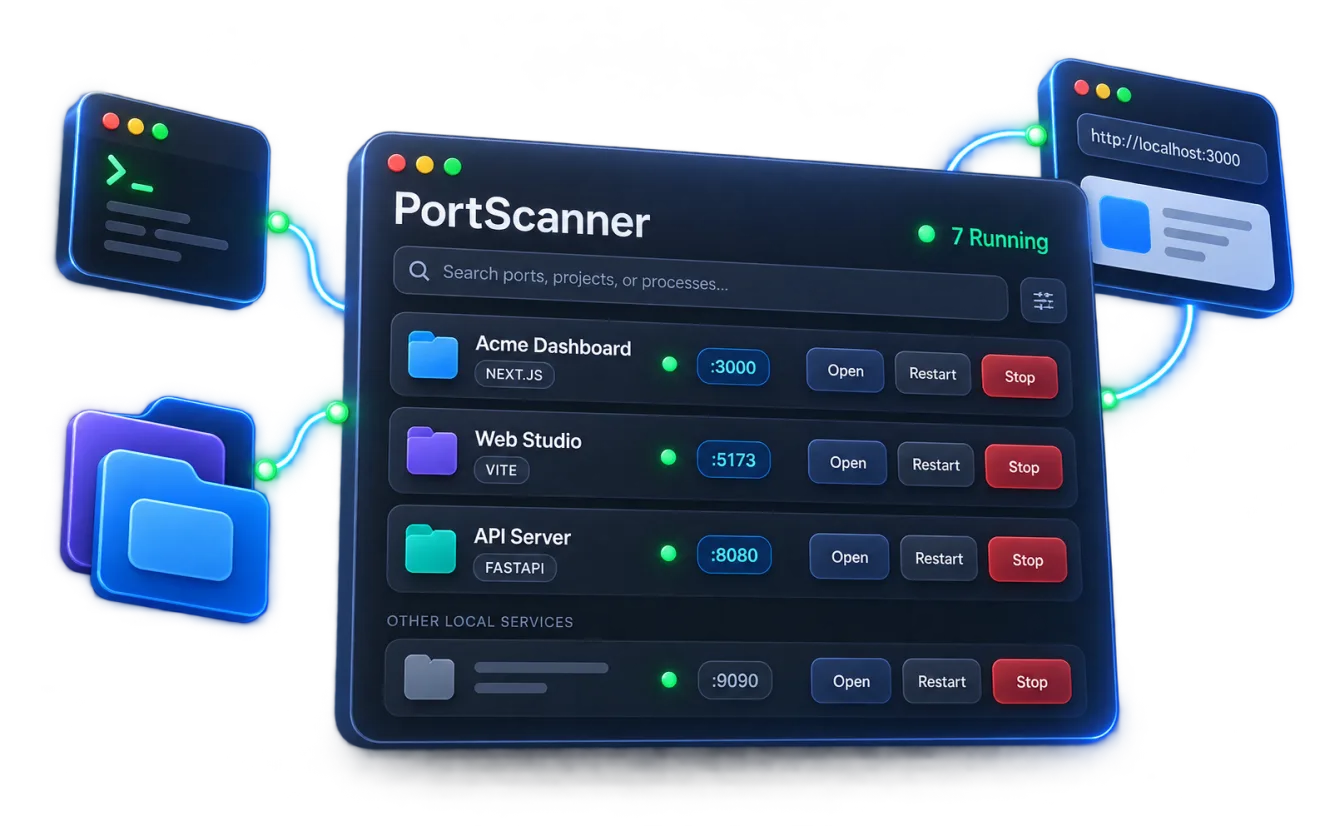
    Live refresh mockup
    Illustrative PortScanner macOS menu-bar utility showing grouped local development projects and ports
    Illustrative product mockup. Release availability is not implied.
    1The problem

    Local development gets messy fast.

    Too many terminals

    Servers remain scattered across terminal windows, IDE sessions, and forgotten background processes.

    Mystery ports

    A port is occupied, but the process, working directory, and project behind it are unclear.

    Unsafe cleanup

    Broad kill commands can terminate the wrong process—or the shell session around it.

    PortScanner turns that process noise into a project-aware workspace.

    2Developer workflow

    Understand localhost as projects, not socket noise.

    Register a folder, review detected metadata, choose a suggested command or enter your own, and confirm before anything runs. Registration without a start command is also supported.

    :3000:5173:8080PID 4821/projects/api
    01127.0.0.1 · ::1 · PID · cwd

    Automatic discovery

    Continuously refresh local TCP listeners and show the process, runtime, working directory, project, PID, and endpoints associated with each listener.

    02:3000 · :3001 · one project

    Project-aware grouping

    Associate listeners with project roots, then group related ports into one stable project card instead of repeating the same repository as loose sockets.

    03SIGTERM → wait → confirmed SIGKILL

    Risk-aware process control

    Start registered commands, restart running projects, or stop exact eligible processes gracefully before a separately confirmed force-kill fallback appears.

    04Finder · VS Code · Cursor · Windsurf · Xcode

    Fast developer actions

    Search by project, runtime, directory, or port; favorite frequent work; open or copy endpoints; and hand projects to installed development tools.

    3How it works

    From listener to the project that owns it.

    01

    Discover

    PortScanner watches local TCP listeners and identifies their owning processes and working directories.

    02

    Understand

    It associates listeners with project roots and groups multiple endpoints into one stable project card.

    03

    Control

    Open endpoints, launch registered commands, restart projects, or stop exact processes with risk-aware confirmation.
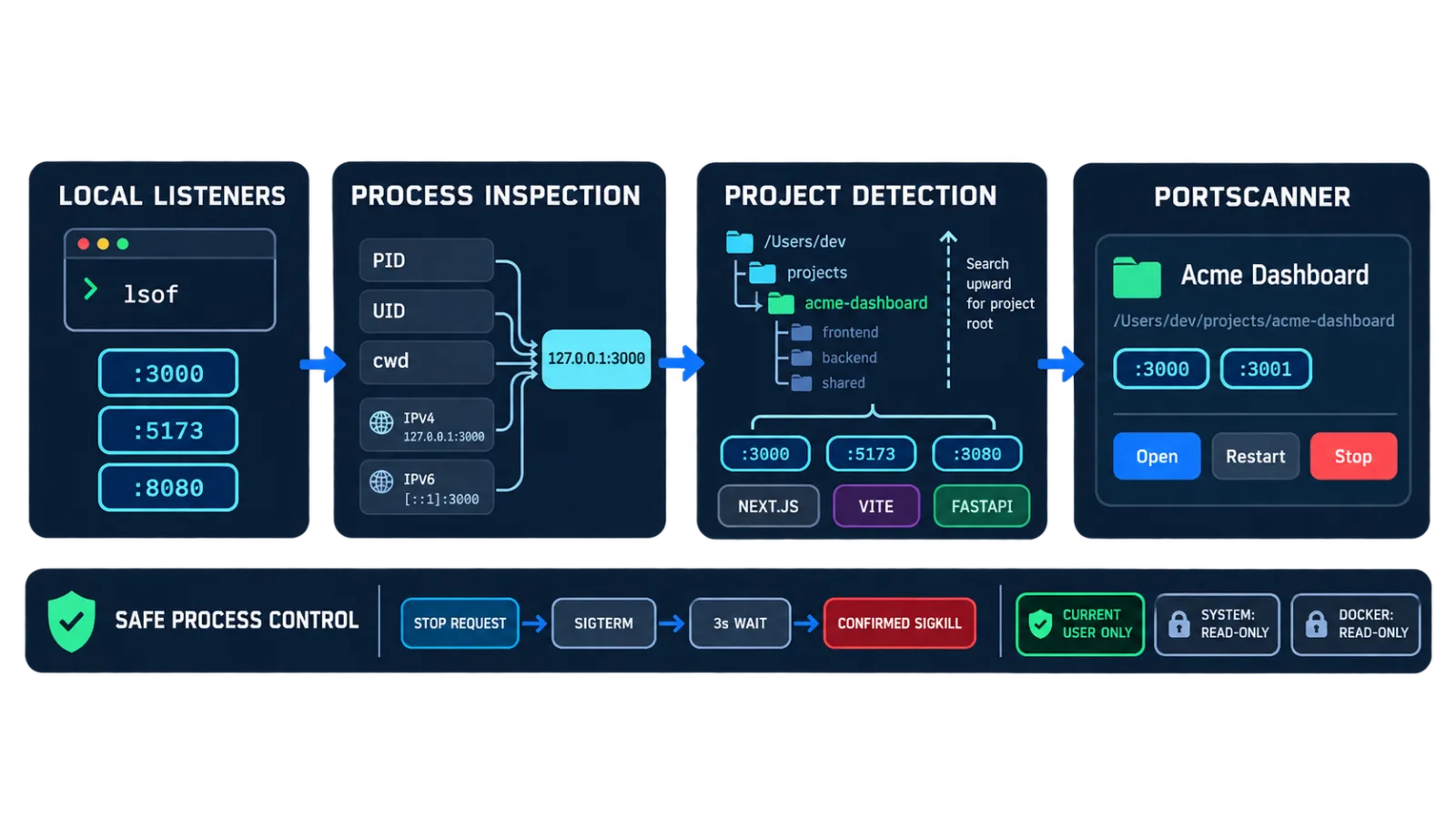
    Illustrative flow from local listeners through process and project detection to safe PortScanner controls
    Local listeners are associated with exact processes and project roots before controls are offered.

    Safety boundary

    Process control without guesswork.

    PortScanner controls the process that owns the port—not the terminal around it.

    Only eligible current-user processes can be controlled
    System services, PID 1, and other users’ processes stay protected
    Docker backends remain visible but read-only
    Graceful SIGTERM is always attempted first
    Force Kill is a separately confirmed fallback
    No administrator access or transmitted process data
    SIGTERMGrace periodConfirmed fallback
    5Runtime recognition

    Familiar runtimes, clearly labelled.

    Recognition is best effort. Services that cannot be identified still appear as clearly labelled local processes.

    01Next.js
    02Vite
    03Node.js
    04Laravel
    05Django
    06FastAPI
    07Python
    08Docker
    09Java
    10.NET
    6Built for developers

    Built for the way local development actually works.

    Open registered projects in Finder or a detected installation of Visual Studio Code, Cursor, Windsurf, or Xcode—without pretending every local service follows the same workflow.

    Multiple repositories
    Monorepos
    Frontend and backend services
    API servers
    Mobile development companions
    Background development tools
    Docker alongside native processes
    7Frequently asked

    Questions, answered.

    8Availability

    Take back your localhost.

    Stop searching terminal tabs for the process behind a port.

    Not publicly releasedDownload, GitHub, documentation, current version, and release links are configurable placeholders. No public release or notarization is claimed.